

How lift access control works in an apartment building
By Namra Shah · Cabling For U · Auckland · Updated October 2026
In most older apartment buildings, anyone who gets through the front door can ride the lift to any floor. Lift access control changes that. Residents can only reach their own floor, and visitors can only reach the floor of the apartment that let them in. It’s one of the most requested upgrades from body corporates, and one of the least understood.
Short answer: A card reader goes in each lift car, and a lift controller connects to the lift’s floor buttons. When a resident swipes their card, only their floor button works. When a resident lets a visitor in through the intercom, the lift releases only that resident’s floor. Your lift company connects the lift side, and the security installer sets up the controllers, cards and permissions.
- Hikvision lift control with your intercom
- We work with your lift company
- 12-month workmanship warranty
How it works for residents and visitors
Card at the door, card in the lift
- Swipe at the entrance to open the door
- Swipe again in the lift
- Only their own floor button works, plus any shared floors they’re allowed
Let in through the intercom
- Call the apartment from the door station
- The resident sees them and unlocks the door
- The lift releases only that resident’s floor
The visitor never needs a card, and they can’t press their way to another floor. The release only lasts for a set time, so the floor locks again afterwards.
What gets installed
- A card reader in each lift car, so residents swipe for their floor.
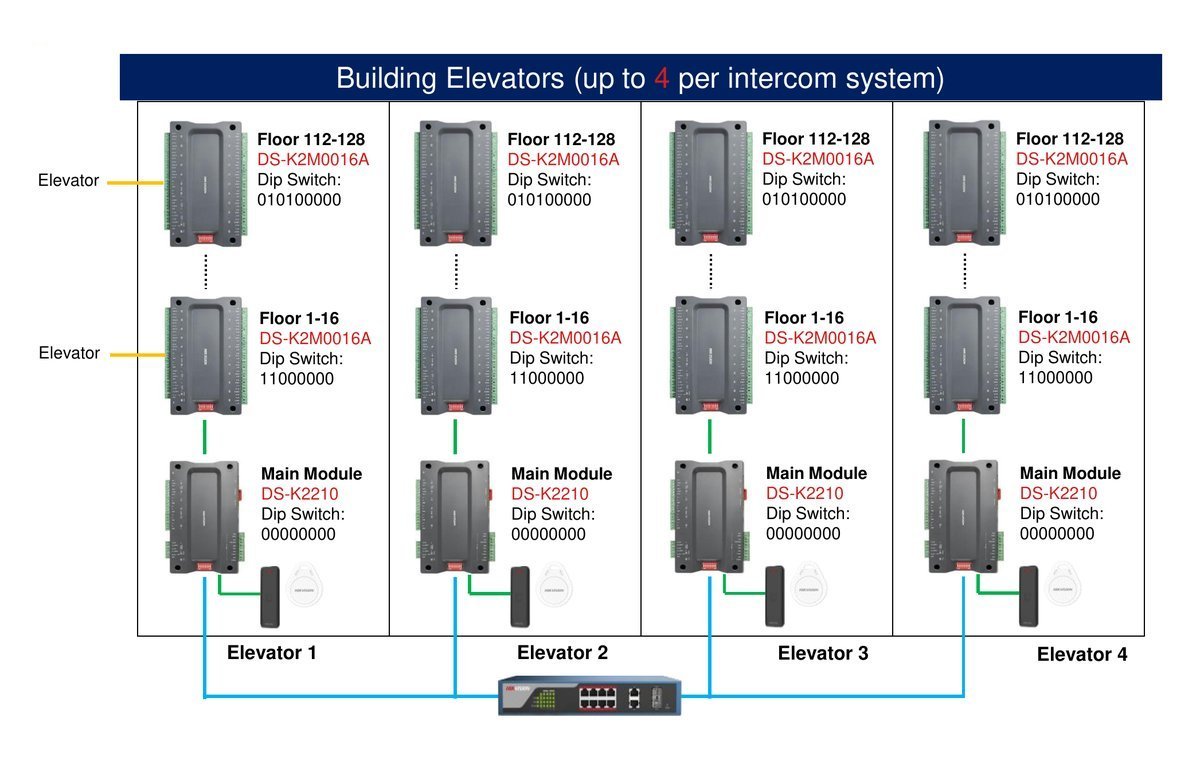
- A lift controller for each lift, usually in the lift machine room or controller cabinet, connected to the intercom system over the building network.
- Relay modules, one for every 16 floors, wired by your lift company to the lift’s floor buttons.
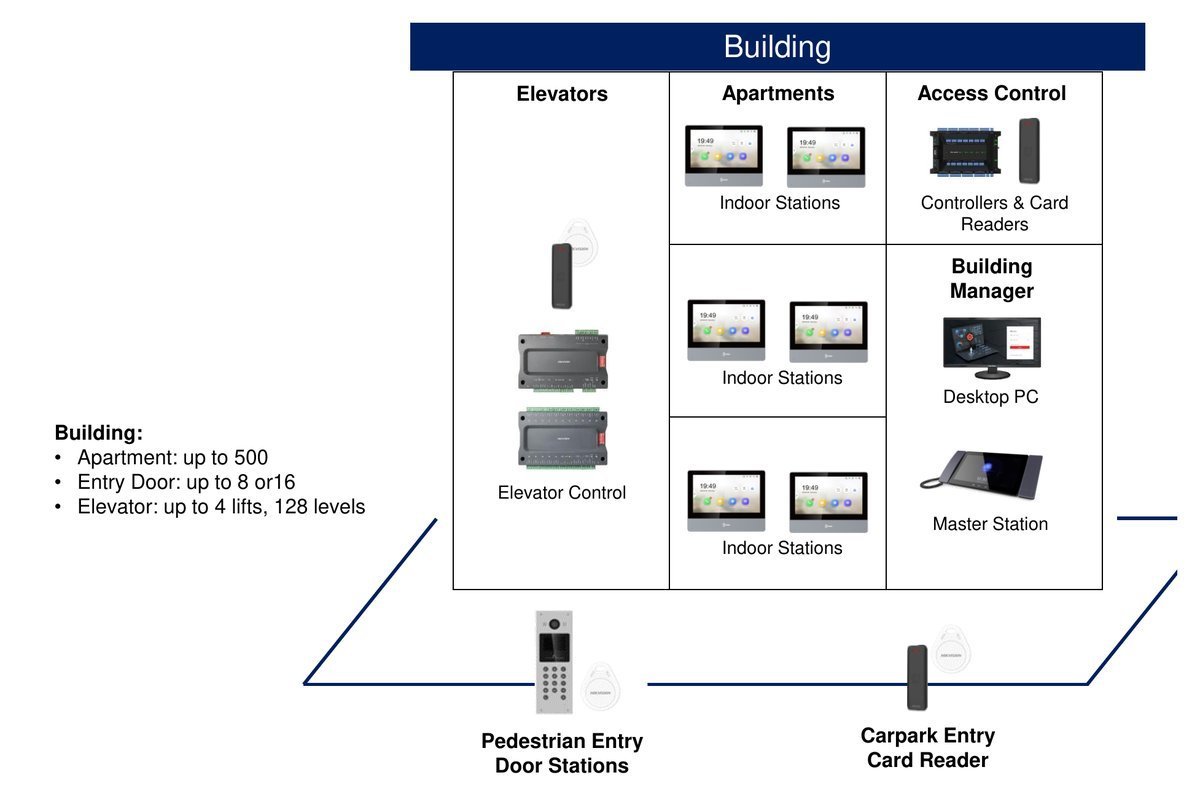
- Door stations and card readers at the entrances, which tell the lift controller who’s been let in and for which floor.
The numbers that matter
| Hikvision lift control | What it means for your building |
|---|---|
| Up to 4 lifts per intercom system | Most apartment buildings are covered by one system. |
| Up to 128 floors | Height isn’t a limit for Auckland apartment buildings. |
| One relay module per 16 floors | A 10-storey building needs one module per lift; taller buildings add more. |
| Resident release time: 1 to 255 seconds | How long the floor stays available after a card swipe. |
| Visitor release time: 1 to 255 minutes | How long a visitor has to reach the lift after being let in. Set separately from residents. |
| Up to 5 cards per person | A resident can have spare cards or tags on one record. |
Who does what: lift company and installer
Lift access control always involves two trades. Getting the split clear before the job starts avoids delays.
The lift side
- Connects the relay modules to the lift’s floor buttons
- Confirms the lift controller can accept access control
- Keeps the lift’s own safety and emergency operation as it should be
The access side
- Installs the card readers, lift controllers and relay modules
- Links lift control to the intercom and door access
- Sets up cards, floors and permissions, and trains your manager
Lifts are usually part of the building’s compliance schedule, so any work on the lift goes through your lift company. We coordinate with them so the lift side and the access side are tested together.
Shared entrances, carparks and several buildings
- Shared entrances. A shared gate or lobby that serves more than one building opens the door only. The visitor then uses the door station at their building, which opens that door and releases the right floor.
- Carparks. A card reader at the carpark entry lets residents in, and the lift from the carpark level can be controlled the same way.
- Shared floors. Gyms, roof terraces and storage levels can be added to every resident’s access, or only to the residents who should use them.
- Older intercoms. Buildings keeping an existing two-wire intercom can still add lift control through Hikvision’s 2-wire to IP converter. See how to replace an old intercom without rewiring.
Managing access after handover
Lift permissions are set up as access levels, usually one for each floor. Each access level includes the entrances and that floor’s lift button. When a new resident moves in, the building manager creates their record and gives it the access level for their floor, and the permissions apply automatically.
- Add or remove residents and cards in a few minutes
- Release a floor or open a door remotely, for example for a contractor
- See which card opened which door or lift floor, and when
On an on-site system this is done in HikCentral Professional. With cloud management, it’s done in the Hik-Connect Team web portal, where lift control has a yearly licence for each lift controller.
Questions to ask before you start
- Has our lift company confirmed the lifts can take access control, and who will connect them?
- Which floors should be shared, such as the carpark, gym or roof?
- How long should a visitor’s floor release last?
- Who will manage cards when residents move in and out?
- Do we want this on an on-site system or managed in the cloud?
- How does the lift behave in a fire alarm or power cut, and has the lift company and fire engineer confirmed it?
Want residents and visitors kept to the right floor?
We’ll look at the building and the lifts, coordinate with your lift company, and quote in writing.
Related reading
- Apartment intercom and access control in Auckland
- How to replace an old apartment intercom without rewiring
- Apartment intercom: indoor screens or a phone app?
- Access control installation
Frequently asked questions
Can a visitor go to any floor once they’re inside?
Not with lift control. When a resident lets a visitor in through the intercom, the lift releases only that resident’s floor, for a set time. The visitor can’t press the button for any other floor, and the floor locks again once the time runs out.
Can residents reach shared floors like the carpark or gym?
Yes. Shared floors are added to residents’ access levels, either for everyone or only for the residents who should use them. A resident’s card then works for their own floor and the shared floors, and nothing else.
Does lift control work with our existing lifts?
Usually, but your lift company needs to confirm it. The relay modules connect to the lift’s floor buttons, and the lift company does that part of the work. We check with them early so there are no surprises once the job has started.
What happens to the lifts in a fire alarm or power cut?
The lift’s own emergency operation stays with the lift company and shouldn’t be overridden by access control. Doors on escape routes can be set to release when the fire alarm goes off. Your lift company and fire engineer confirm how it works for your building.
Can we add lift control to an older intercom?
Often, yes. Buildings keeping an existing two-wire intercom can add lift control through Hikvision’s 2-wire to IP converter, which connects the intercom to the lift controllers. Buildings with a newer IP intercom connect the lift controllers directly.
How much does lift access control cost?
Every building is quoted on its own. The number of lifts and floors, the number of entrances, the lift company’s part of the work, and whether the system is on site or in the cloud all change the price. We quote in writing after a free site assessment.
Who wrote this
Namra Shah installs security systems and structured cabling across Auckland through Cabling For U. PSPLA Company Licence 25-132031 (Security Technician), SiteSafe Passport holder, $10M public liability. Cabling For U is a trading name of HARIKRUPA LIMITED, NZBN 9429046975126, incorporated 22 August 2018. Every install carries a 12-month workmanship warranty.
Planning lift access control for your building? Book a free site survey or call 0800 222 546.