

How to replace an old apartment intercom without rewiring the building
By Namra Shah · Cabling For U · Auckland · Updated October 2026
Many Auckland apartment blocks still run the intercom that went in when the building was new. Handsets crackle, parts are hard to find, and residents want to see who’s at the door. The usual worry for a body corporate is that replacing it means opening walls in every apartment. Often it doesn’t.
Short answer: If your building has a two-wire intercom and the cable is in good condition, a modern 2-wire HD system can reuse that cable. The door stations, apartment handsets and riser equipment are replaced, but the wiring to each apartment stays, so lived-in apartments don’t need new cabling. The cable should be tested before anything is quoted.
- Existing cable tested before we quote
- Itemised written quote for the body corporate
- 12-month workmanship warranty
Signs your intercom is due for replacement
- Dead or crackling handsets. Some apartments can’t hear visitors, or visitors can’t hear them.
- No spare parts. The original brand has moved on, and failed handsets can’t be matched.
- Audio only, or poor video. Residents can’t see who they’re letting in.
- Unreliable door release. The door doesn’t always unlock when a resident presses the button.
- No record of who’s let in. The building manager can’t see which doors were opened, or when.
- Residents asking for phone answering. People want to answer the door when they’re not home.
Why rewiring is the hard part
In an occupied apartment building, the cable is the expensive and disruptive part of an intercom upgrade, not the equipment. New cable to every apartment means access to each one, work in ceilings and walls, cable through shared risers, and making good afterwards. It also means more notices to residents and more time on site.
That’s why the first question for any older building is whether the existing intercom cable can carry a new system.
How 2-wire HD reuses the old cable
Hikvision’s 2-wire HD intercom sends HD video, two-way audio, door release and power over a single pair of wires, the same pair many older intercoms already run to each apartment. The old door station and handsets come off, and new ones connect to the existing cable through distributors in the riser or comms cupboard.
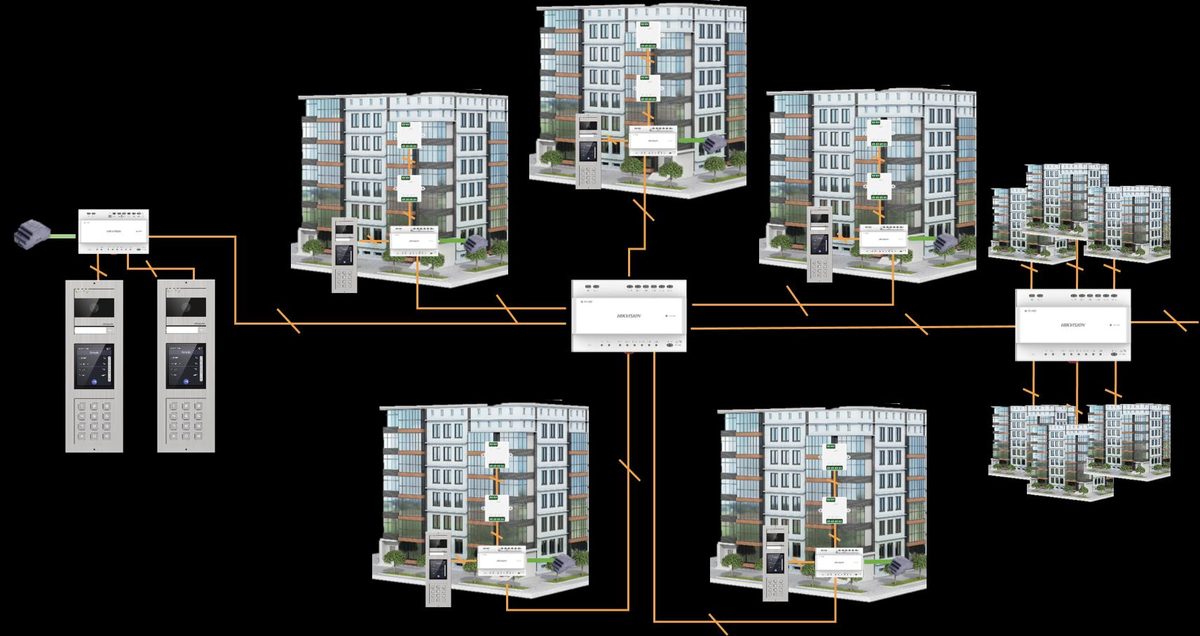
| Hikvision 2-wire HD | What it means for your building |
|---|---|
| Up to 400 apartments per building | Large blocks can be upgraded on the same system. |
| Up to 16 door stations per building | Front entrance, carpark and side doors can all have their own door station. |
| Up to 10 shared entrances | A shared gate or lobby can call apartments in more than one building. |
| Distributors on the existing cable | New equipment goes in the riser or comms cupboard, not inside apartments. |
| 2-wire to IP converter | Lets the building add lift control, a front desk station and IP cameras later. |
The type and condition of the cable decide how far each run can go and how many screens it can support. Shielded cable is preferred, and every run should be tested before the design is fixed.
What stays and what’s replaced
The cable and its routes
- The two-wire cable to each apartment, where it tests sound
- The cable routes through risers and ceilings
- Existing door positions, if they still suit
The equipment
- Door stations at each entrance
- Apartment handsets, replaced with video screens
- Distributors and power supplies in the riser
- Any cable run that fails testing
Adding modern features to an older block
Keeping the old cable doesn’t mean missing out on newer features. With Hikvision’s 2-wire to IP converter, an older building can add:
- Lift control, so a visitor only reaches the floor of the apartment that let them in. We work with your lift company, who connect the lift side.
- A front desk station for a concierge or security desk to answer calls and open doors.
- Building cameras on the indoor screens, so residents can view a camera at the entrance.
- Phone answering. Wi-Fi models of the indoor screen link to the Hik-Connect app, so residents can see and answer the door on their phone.
- Card access at the door station, so residents can use a card instead of a key.
When rewiring is the better choice
Reusing the cable isn’t always right. We’ll recommend new cabling instead when:
- Testing shows too many runs are damaged, too long, or the wrong type to carry a 2-wire HD signal reliably
- The building is being refurbished anyway, so walls and ceilings are already open
- New data cabling is going in, and an IP intercom can share it
- The body corporate wants features that need an IP system throughout
For new developments, an IP intercom designed in from the plans is usually the better fit. See apartment intercom and access control for how the options compare.
How the job runs
- Site assessment. We look at the entrances, risers and existing equipment, and test the intercom cable.
- Design. Door stations, apartment screens, distributors and any extras such as lift control, laid out for your building.
- Written quote. Itemised, so the body corporate committee can see exactly what it’s approving, including any runs that need replacing.
- Install. Planned around residents, with notice before we need access to any apartment.
- Switch-over and handover. Every apartment tested, residents shown the new screens, and your building manager trained to run the system.
Questions to ask an installer
- Will you test the existing cable before you quote?
- Which parts will be reused, and which will be replaced?
- What happens to an apartment whose cable fails testing?
- Can we add lift control, a front desk station or phone answering later?
- Who owns the system and its accounts after handover?
- Are you PSPLA licensed, and what warranty and maintenance do you offer?
Old intercom playing up?
We’ll test the existing cable, tell you what can be reused, and quote in writing for your building.
Related reading
- Apartment intercom and access control in Auckland
- Apartment intercom: indoor screens or a phone app?
- How lift access control works in an apartment building
- Security for property managers
- Access control installation
- Private fibre networks for developments
Frequently asked questions
Can any old intercom be upgraded without rewiring?
Not every one, but many can. Many older apartment intercoms run a two-wire cable to each apartment, and a 2-wire HD system can reuse it if the cable is in good condition. We test the cable on a site visit before quoting, because its type and condition decide what can be reused.
Will residents need any work done inside their apartment?
Yes, but it’s small. The old handset comes off the wall and a new video screen goes on, connected to the existing cable. We give residents notice before we need access, and plan the visits so each apartment is only disturbed once.
Can residents answer the door on their phone?
Yes, with Wi-Fi models of the indoor screen. They link to the Hik-Connect app, so residents can see and answer visitors on their phone. The screen in the apartment still works as normal for anyone who prefers it.
Can we add lift control to a 2-wire system?
Yes. Hikvision’s 2-wire to IP converter connects the system to lift controllers, so a visitor only reaches the floor of the apartment that let them in. We set up the controllers and permissions, and your lift company connects the lift side.
What happens if some of the cable is damaged?
We replace only the runs that fail testing, and we tell you which ones before quoting. If too much of the cable is damaged or the wrong type, we’ll say so and recommend new cabling instead of reusing it.
How much does it cost to replace an apartment intercom?
Every building is quoted on its own after a free site assessment. The number of apartments and entrances, how much cable can be reused, and extras such as lift control or phone answering all change the price. The quote is itemised for the body corporate.
Who wrote this
Namra Shah installs security systems and structured cabling across Auckland through Cabling For U. PSPLA Company Licence 25-132031 (Security Technician), SiteSafe Passport holder, $10M public liability. Cabling For U is a trading name of HARIKRUPA LIMITED, NZBN 9429046975126, incorporated 22 August 2018. Every install carries a 12-month workmanship warranty.
Thinking about replacing your building’s intercom? Book a free site survey or call 0800 222 546.